

The CRO Audit Checklist No Chandigarh Agency Wants You to See
- What Makes CRO Audits Different From Regular Website Reviews?
- Key Differences Between CRO Audits and General Website Audits
- Step-by-Step CRO Audit Process (With Chandigarh Context)
- 1. Analytics Audit
- 2. User Journey Mapping
- 3. Landing Page Assessment
- 4. Form and Funnel Review
- 5. CRO Benchmarks Comparison
- 6. Fixes and Prioritisation
- Key Elements of a Proper Website Conversion Analysis
- Chandigarh-Specific Considerations
- Common Conversion Killers
- User Journey Mapping: Finding Where Visitors Get Stuck
- Tools and Methods
- Example: Mapping a Local Service Journey
- Landing Page Assessment: What to Check (And What Most Agencies Miss)
- What to Review
- Common Agency Mistakes
- Example: A/B Testing in Chandigarh
- Analytics Audit: The Foundation of Every CRO Audit
- Key Steps in an Analytics Audit
- Common Problems
- Chandigarh Agency Review: Typical Analytics Gaps
- CRO Benchmarks: How Does Your Site Compare?
- Typical Benchmarks (India/Chandigarh)
- How to Use Benchmarks
- Common CRO Audit Mistakes (And How to Avoid Them)
- Best Practices for Ongoing CRO Success
- Establish a Regular Audit Routine
- Build a Testing Backlog
- Involve Real Users
- Stay Updated With Local Trends
- Frequently Asked Questions
- What are the essential CRO audit steps for any website?
- How does a website conversion analysis improve sales?
- What are common CRO benchmarks for India or Chandigarh businesses?
- How do I map the user journey on my website?
- What is a landing page assessment in CRO?
- How often should I perform a CRO audit?
- Which tools are best for CRO audits?
- What mistakes do agencies make during CRO audits?
- How does analytics audit differ from a basic analytics review?
- Can CRO audits help service businesses, not just ecommerce?
- How do I compare my conversion rates with CRO benchmarks?
- What is the role of user journey mapping in CRO?
- How can I prioritise fixes after a CRO audit?
- Is it necessary to A/B test every CRO change?
- How do I know if a CRO agency in Chandigarh is doing a good job?
- Key Takeaways
You’ve got a website pulling traffic, but leads are trickling in slower than a Chandigarh summer afternoon. Maybe your agency sent you a monthly report full of graphs and bounce rates, but conversions still aren’t budging. You’re not alone. Most businesses here see the same story: lots of visitors, few buyers, and even fewer real answers about what’s actually broken. That’s where the right CRO audit steps can make a visible difference – if you know what to look for, and if you don’t get lost in technical jargon.
Conversion Rate Optimization (CRO) isn’t just a buzzword. For anyone running campaigns, especially in competitive markets like Chandigarh, it’s the difference between a website that pays for itself and one that just eats up your ad budget. The problem? Most audits are surface-level. They miss the real friction points and never explain why users drop off. If you want a checklist that digs deeper than the typical Chandigarh agency review, you’re in the right place.
A proper CRO audit means following a clear, step-by-step process: reviewing analytics, mapping the user journey, assessing landing pages, and comparing your performance with CRO benchmarks – all to find and fix what’s killing your conversions.
The Real CRO Audit Steps Every Site Needs
A strong CRO audit isn’t about ticking boxes. It’s about understanding how real people move through your site and where they get stuck. Here’s how to actually run a website conversion analysis that uncovers problems agencies often gloss over.
What Makes CRO Audits Different From Regular Website Reviews?
Many site owners think a CRO audit is just a fancy website checkup. That’s not true. A basic website review looks at broken links, design, maybe some SEO. But a CRO audit goes deeper. It asks: Why aren’t visitors turning into leads or sales? What’s stopping them? And how can you fix it?

- Website conversion analysis looks at every step from first click to final purchase or signup.
- CRO audits use real data, not guesses. They rely on tools like Google Analytics, Hotjar, or Mixpanel.
- Instead of focusing only on visuals, CRO audits combine numbers, user feedback, and proven industry benchmarks.
For example, a Chandigarh agency review might tell you your homepage bounce rate is 60%. But a CRO audit will ask: Is the headline clear? Do users know where to click next? Why do they leave after 10 seconds?
Key Differences Between CRO Audits and General Website Audits
| Feature | General Website Audit | CRO Audit |
|---|---|---|
| Focus | Technical/SEO/design | Conversions/user flow |
| Data Used | Site speed, SEO, errors | Analytics, heatmaps |
| Outcome | Fix bugs, improve SEO | Boost sales/leads |
| Tools | Screaming Frog, SEMrush | GA4, Hotjar, VWO |
| Typical Deliverable | Error list, SEO tips | Actionable test ideas |
Honestly, if you’re only running a standard audit, you’re missing the real money leaks.
Step-by-Step CRO Audit Process (With Chandigarh Context)
To run an effective CRO audit, you need a sequence. Not just random checks. Here’s the practical process that works for local businesses, SaaS, and ecommerce alike:
- Analytics Audit
- User Journey Mapping
- Landing Page Assessment
- Form and Funnel Review
- CRO Benchmarks Comparison
- Fixes and Prioritisation
Let’s break down each step with real details.
1. Analytics Audit
Start with the numbers. But don’t just look at sessions and bounce rates. Dig into:
- Which pages get the most exits?
- Where do users drop out of the funnel?
- Are your goals (form fills, calls, purchases) tracking correctly?
- Does your data even match reality? (I’ve seen Chandigarh agencies report 0 conversions because the tracking code was missing for months.)
Use Google Analytics 4, but also check Search Console, CRM data, and (if possible) server logs.
2. User Journey Mapping
Map out the actual path a user takes. Not the path you wish they’d take. For example:
- First visit: lands on a blog page
- Clicks to a service page
- Reads for 8 seconds
- Bounces
Draw this out. Tools like Miro or even pen and paper work. The goal is to spot where the journey breaks. Sometimes users get stuck between steps. Sometimes they never see your call-to-action at all.
3. Landing Page Assessment
Landing pages are where most conversions happen – or die. You need to check:
- Headline clarity (does a new visitor understand your offer in 5 seconds?)
- Form length (more than 4 fields? That’s a killer)
- Mobile experience (try it on a slow Jio connection)
- Call-to-action buttons (are they visible, clear, and above the fold?)
Run a 5-second test: show your landing page to someone who hasn’t seen it. Ask them what you offer and what they should do next. If they fumble, your page needs work.
4. Form and Funnel Review
Forms are where users often give up. Check:
- Required vs optional fields (do you really need their company size?)
- Error handling (do users get helpful messages if they make a mistake?)
- Funnel steps (how many clicks from homepage to thank-you page?)
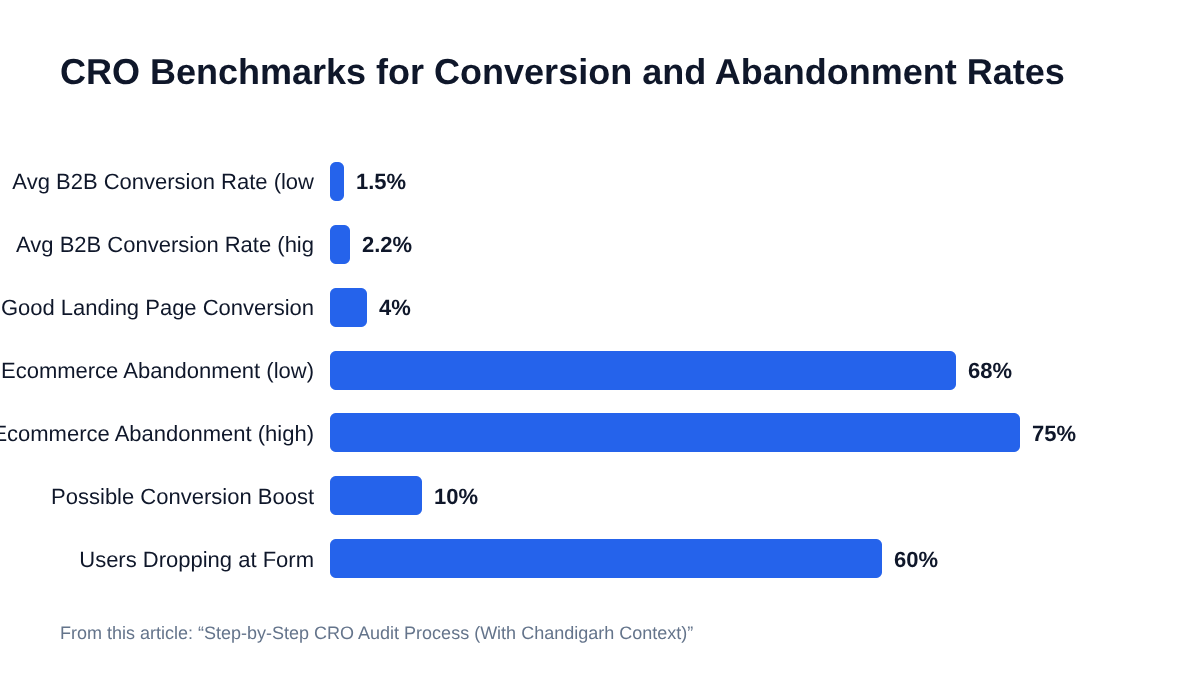
If you have a multi-step funnel, check drop-off at each stage. Use tools like Hotjar to watch actual user recordings. Sometimes, a small fix (like removing a password confirmation) can boost conversions by 10%.
5. CRO Benchmarks Comparison
Compare your numbers to industry standards. Some examples:
- Average website conversion rate (India, B2B): 1.5 – 2.2%
- Good landing page conversion rate: over 4%
- Average ecommerce checkout abandonment: 68 – 75%
If your numbers are way off, you’ve found a red flag. But don’t panic over small gaps. Focus on the biggest leaks first.
6. Fixes and Prioritisation
Don’t try to fix everything at once. Pick the top 2 – 3 issues that will make the biggest impact. Prioritise based on:
- How easy it is to fix (low effort, high reward)
- The size of the problem (are 60% of users dropping off at your form?)
- What you can test quickly (like changing a headline or button text)
It’s better to fix one major issue well than to half-fix a dozen small things.
Key Elements of a Proper Website Conversion Analysis
A proper website conversion analysis isn’t only about numbers. It’s about understanding what those numbers actually mean for real users in your market.
A conversion analysis typically covers:
- Traffic sources: Are users coming from Google, Instagram, or paid ads?
- Device breakdown: Are mobile users converting worse than desktop?
- User intent: Are visitors here to buy, learn, or just browse?
- On-page behaviour: Where do users click, scroll, or get stuck?
- Conversion paths: Which steps lead to the most conversions?
Chandigarh-Specific Considerations
Chandigarh audiences may behave differently than Delhi or Mumbai. For example:
- Local service businesses often get more WhatsApp or call leads than form fills.
- College students may use mobile exclusively, with patchy connections.
- B2B buyers might want downloadable PDFs or WhatsApp consultations, not just email forms.
Common Conversion Killers
- Slow loading times during peak hours (especially on mobile)
- Vague headlines or generic offers
- Too many form fields
- No trust signals (testimonials, local awards, Google reviews)
- Bad mobile experience (menus that won’t close, tiny buttons)
If you spot any of these, fix them before going after smaller issues.
User Journey Mapping: Finding Where Visitors Get Stuck
User journey mapping is about tracing the steps a real person takes on your site, so you can see exactly where they lose interest or get confused.
Start by listing every major touchpoint:
- Entry page (where do they land?)
- Navigation (how do they move around?)
- Key actions (filling a form, calling, downloading a PDF)
- Exit points (where do they drop off?)
Tools and Methods
- Google Analytics: Use the Behavior Flow and User Explorer reports.
- Hotjar/Clarity: Watch session replays to see real user journeys.
- On-site surveys: Ask users what they expected to find, or why they didn’t convert.
Example: Mapping a Local Service Journey
Suppose a Chandigarh interior design firm gets most traffic to its portfolio page. But conversions are low.
- Users land on the portfolio, scroll through photos, then leave.
- Only 10% click to the ‘Book Consultation’ form.
- Of those, half abandon the form after seeing a required phone number field.
The map tells you: the call-to-action is buried, and the form feels too intrusive. Fix those, and conversions should rise.
Landing Page Assessment: What to Check (And What Most Agencies Miss)
Landing pages are where most revenue is won or lost. The best landing page assessment checks more than just design.
What to Review
- Headline: Clear, benefit-driven, matches ad or search intent.
- Subheadline: Supports the main headline, gives detail.
- Visual hierarchy: Is the most important info at the top?
- Social proof: Testimonials, reviews, trust badges.
- Offer clarity: Exactly what will the user get? (Avoid vague promises)
- Call-to-action: Is it clear, prominent, and above the fold?
- Mobile usability: Can you fill the form and click the CTA with one thumb?
- Page speed: Should load in under 3 seconds, even on 4G.
Common Agency Mistakes
- Using the same generic CTA on every page
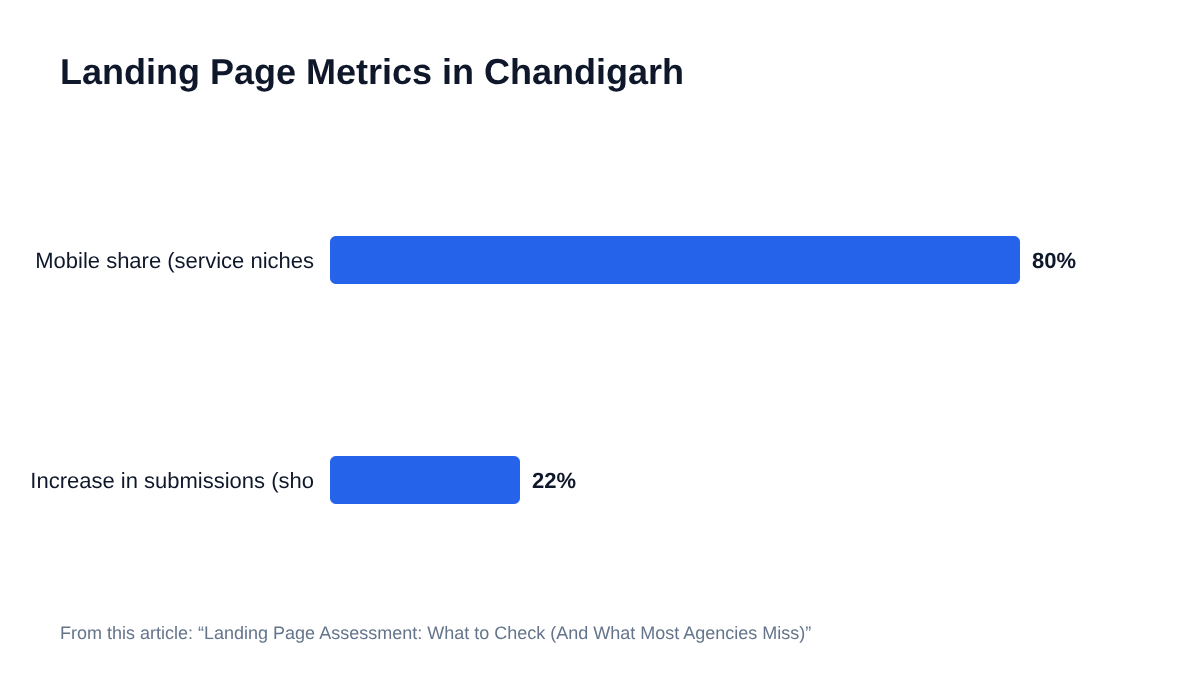
- Ignoring mobile layout (Chandigarh’s mobile share is over 80% for many service niches)
- Forgetting to A/B test headlines or images
- Overloading the page with too many offers or options
Example: A/B Testing in Chandigarh
A Chandigarh-based law firm tested two landing pages: one with a long explanation, one with a short, direct headline. The short version increased form submissions by 22% in a month. Sometimes, less is more.
Analytics Audit: The Foundation of Every CRO Audit
You can’t fix what you can’t measure. An analytics audit checks whether you’re tracking the right things, and whether the data even makes sense.
Key Steps in an Analytics Audit
- Ensure Google Analytics 4 is installed on every page.
- Check goal tracking (form fills, calls, WhatsApp clicks, purchases).
- Review conversion attribution (do conversions show up under the right channel?)
- Validate data accuracy (compare with CRM or backend numbers).
- Set up event tracking for key actions (scroll depth, video plays, downloads).
Common Problems
- Tracking code only on the homepage
- Double-counting conversions from the same user
- Missing tracking for WhatsApp or call buttons
- Funnels not set up, so you can’t see drop-off points
Chandigarh Agency Review: Typical Analytics Gaps
Many Chandigarh agencies still use Universal Analytics (which is now sunset by Google). Or they forget to set up event tracking for local calls and WhatsApp leads. If your reports don’t show every type of conversion, your audit is incomplete.
CRO Benchmarks: How Does Your Site Compare?
CRO benchmarks help you see whether your site’s performance is actually bad, or just normal for your industry and region.
Typical Benchmarks (India/Chandigarh)
| Metric | Typical Value |
|---|---|
| Website conversion rate | 1.5% – 3.2% |
| Landing page conversion rate | 3% – 8% |
| Ecommerce checkout abandon | 68% – 75% |
| Average form fill rate | 2% – 5% |
| B2B lead gen conversion rate | 1% – 2.5% |
If your landing page is converting at 1%, you’re below average. But if your ecommerce store sees 3.5%, you’re doing great. Use these numbers as a guide, but always test for yourself.
How to Use Benchmarks
- Identify which pages or funnels underperform.
- Set realistic improvement targets.
- Communicate results with stakeholders (no more guessing if 2% is ‘good’ or ‘bad’).
Common CRO Audit Mistakes (And How to Avoid Them)
Even experienced teams slip up. Here are the top mistakes I’ve seen in Chandigarh and beyond.
- Relying only on heatmaps or analytics: Numbers matter, but user interviews and surveys often reveal problems tools can’t see.
- Copying competitor designs blindly: What works for one site may flop for yours.
- Ignoring micro-conversions: Small steps (like PDF downloads or video plays) can show intent.
- Not testing one change at a time: If you change 5 things and conversions improve, you won’t know what worked.
- Skipping mobile checks: With 80%+ mobile traffic in many sectors, desktop-only audits miss the real story.
If you avoid these, your CRO audit steps will actually deliver results.
Best Practices for Ongoing CRO Success
A one-time audit is better than nothing. But real gains come from ongoing testing and improvement.
Establish a Regular Audit Routine
- Run a full CRO audit every 6 – 12 months.
- Check analytics and conversion rates monthly.
- Run 1 – 2 A/B tests per quarter.
Build a Testing Backlog
- List every potential improvement (headlines, forms, offers, layouts)
- Prioritise by impact and effort
- Test the highest-impact changes first
Involve Real Users
- Run usability tests with 5 – 10 real customers
- Ask for feedback after form submissions or purchases
- Monitor reviews and support tickets for conversion barriers
Stay Updated With Local Trends
- Watch for changes in user behaviour (e.g., more WhatsApp queries post-lockdown)
- Track competitors’ offers and landing pages
- Adjust based on seasonality (summer holidays, festival sales, local events)
Frequently Asked Questions
What are the essential CRO audit steps for any website?
The essential CRO audit steps include analytics audit, user journey mapping, landing page assessment, form and funnel review, comparison with industry benchmarks, and prioritising fixes. Following this sequence ensures you find and address the biggest conversion blockers.
How does a website conversion analysis improve sales?
A website conversion analysis pinpoints where users drop off or get confused, helping you fix those areas to boost leads or sales. By tracking real user journeys and comparing with CRO benchmarks, you can make targeted changes that actually increase revenue.
What are common CRO benchmarks for India or Chandigarh businesses?
Typical CRO benchmarks for India include a 1.5 – 3.2% website conversion rate, 3 – 8% landing page conversion, and 68 – 75% ecommerce checkout abandonment. Chandigarh businesses often see similar numbers, but local service firms may get more conversions through calls or WhatsApp.
How do I map the user journey on my website?
To map the user journey, list all major touchpoints: entry page, navigation paths, key actions like form fills or calls, and exit points. Use tools like Google Analytics Behavior Flow and Hotjar session recordings to trace real user paths and spot drop-offs.
What is a landing page assessment in CRO?
A landing page assessment reviews headline clarity, offer strength, call-to-action visibility, mobile usability, form length, and trust signals. The goal is to ensure users understand your offer and can convert easily, especially on mobile.
How often should I perform a CRO audit?
Most experts recommend a full CRO audit every 6 – 12 months, with monthly analytics checks and regular A/B testing. More frequent reviews may be needed if your site changes often or you run many campaigns.
Which tools are best for CRO audits?
Key tools include Google Analytics 4, Hotjar or Microsoft Clarity for heatmaps and session recordings, Google Optimize or VWO for A/B testing, and on-site survey tools like Typeform or SurveyMonkey for collecting user feedback.
What mistakes do agencies make during CRO audits?
Common mistakes include focusing only on analytics, ignoring mobile users, copying competitors blindly, not testing one change at a time, and skipping user feedback. These errors can lead to wasted effort and missed opportunities.
How does analytics audit differ from a basic analytics review?
An analytics audit checks data accuracy, ensures all goals and events are tracked, validates attribution, and matches analytics with backend numbers. A basic review may only look at top-line metrics without verifying setup or accuracy.
Can CRO audits help service businesses, not just ecommerce?
Yes, CRO audits benefit service businesses by improving lead form conversions, call tracking, and local user experience. For example, optimising for WhatsApp or phone leads is often critical in Chandigarh.
How do I compare my conversion rates with CRO benchmarks?
Gather your site’s conversion rates (overall, by page, by funnel step), then compare them to published CRO benchmarks for your industry and region. Focus on areas with the biggest gaps for improvement.
What is the role of user journey mapping in CRO?
User journey mapping reveals where users get stuck or drop off, so you can fix those points and improve overall conversion rates. It’s an essential step in any CRO audit.
How can I prioritise fixes after a CRO audit?
Rank issues based on potential impact, how easy they are to fix, and how many users they affect. Tackle high-impact, low-effort fixes first, then test and measure results before moving to the next item.
Is it necessary to A/B test every CRO change?
Not every change needs an A/B test, especially obvious fixes (like broken buttons). But for major elements (headlines, CTAs, layouts), A/B testing helps prove what actually works and avoids guessing.
How do I know if a CRO agency in Chandigarh is doing a good job?
A good CRO agency will show you clear before-and-after data, explain their CRO audit steps, and prioritise fixes based on impact. They’ll also focus on local user behaviour and mobile experience – not just generic recommendations.
Key Takeaways
- CRO audit steps include analytics audit, user journey mapping, landing page assessment, and benchmarking.
- Most Chandigarh agencies focus on surface-level fixes, missing deeper conversion barriers.
- Always verify your analytics data before making decisions.
- User journey mapping reveals hidden drop-off points.
- Landing page assessments must include headline clarity, offer strength, and mobile usability.
- Compare your numbers to CRO benchmarks to set realistic goals.
- Avoid copying competitors blindly – test what works for your audience.
- Prioritise high-impact, low-effort fixes first.
- Regular audits and ongoing A/B testing drive long-term improvements.
- Involve real users in feedback and testing for the best results.
If you want more sales or leads from your website, you need to move beyond generic reports and run a detailed CRO audit using the steps above. The right process uncovers issues that even seasoned agencies in Chandigarh often overlook. Fix the biggest leaks first, test your changes, and keep improving. No single checklist will cover every edge case, but with these CRO audit steps, you’ll finally know where to focus – and why your conversions are (or aren’t) growing.